Sync Your Outlook Calendar with Excel
Import calendar events to Excel. Edit in bulk. Export back to Outlook. No coding required.
From the makers of Sheets2GCal (8M+ installs)
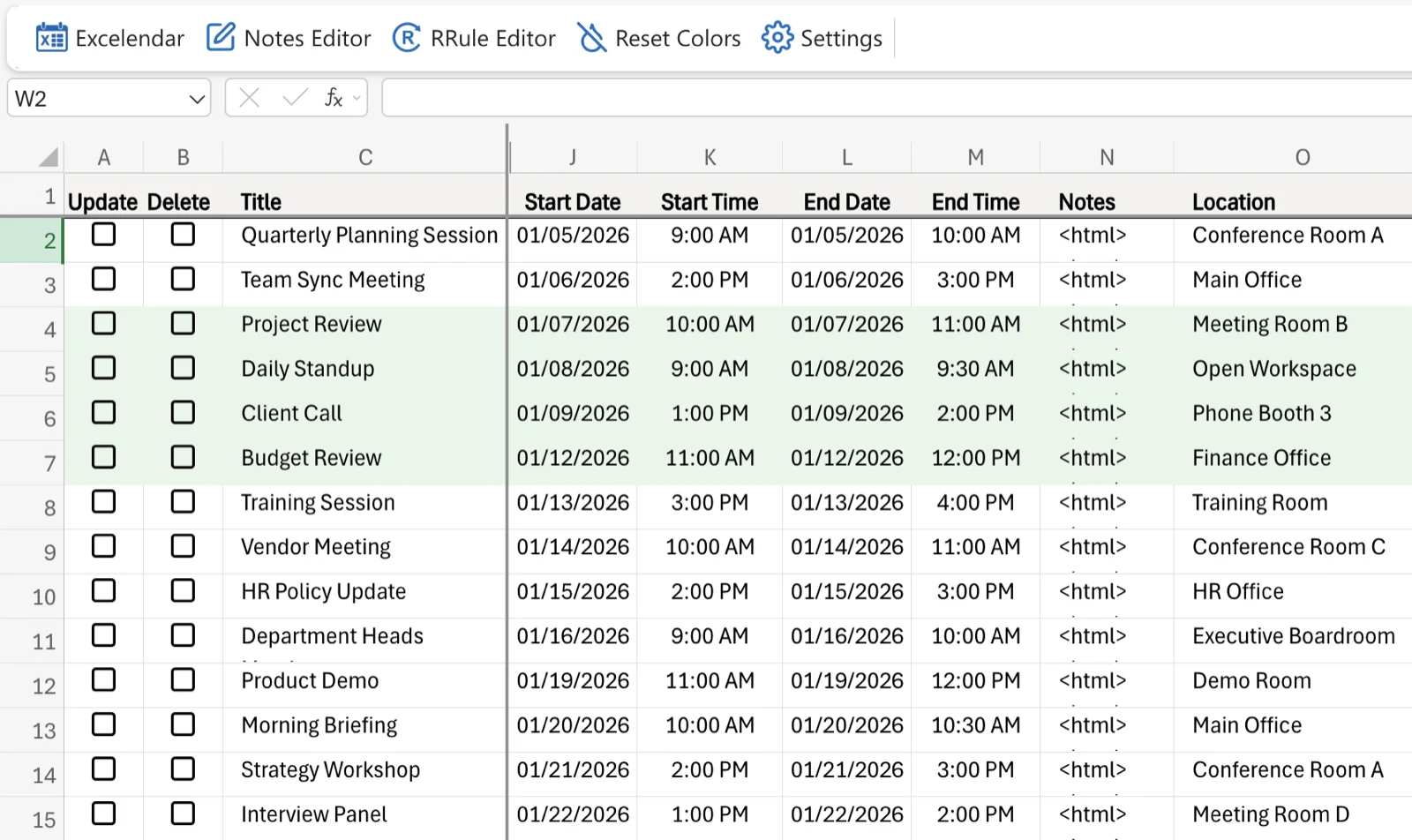
Your Outlook Calendar in Excel
Import all your calendar events into Excel rows
Edit in bulk: sort, filter, use formulas, copy-paste
Export changes back to Outlook in one click
Full support for recurring events, attendees, and categories
Add columns for meeting durations, private notes etc.
Display times in any timezone
Works in Excel Online and Excel Desktop
Free trial included with every plan
Three Steps, Zero Complexity
No coding. No complex setup. Just import, edit, and export.
1
Import
Pull calendar events from Outlook into Excel rows. Each event becomes a row, each property a column.
2
Edit in Excel
Use Excel's full power - formulas, sorting, filtering, copy-paste. Edit one event or hundreds at once.
3
Export
Push your changes back to Outlook in bulk. New events, updates, and deletions - all in one click.
Try Excelendar Free
Works with Microsoft 365 personal and business accounts.
Use with Excel Online and Desktop from as little as $8 per month.